
Purpose: See hours, pay and tips by employee and date range, and export them to Excel for payroll. For: owners, managers.
Before you start: The Time Card report is a simple payroll statement: it lists hours, pay and tips, but doesn’t calculate taxes or other deductions (official docs). Pay is based on the employee’s Pay Basis and Pay Rate (see 2.8.2 How to add an employee and set their passcode). Time card records can only be edited at the POS (official docs); see 2.8.5 How to edit or add time card records.
Steps #
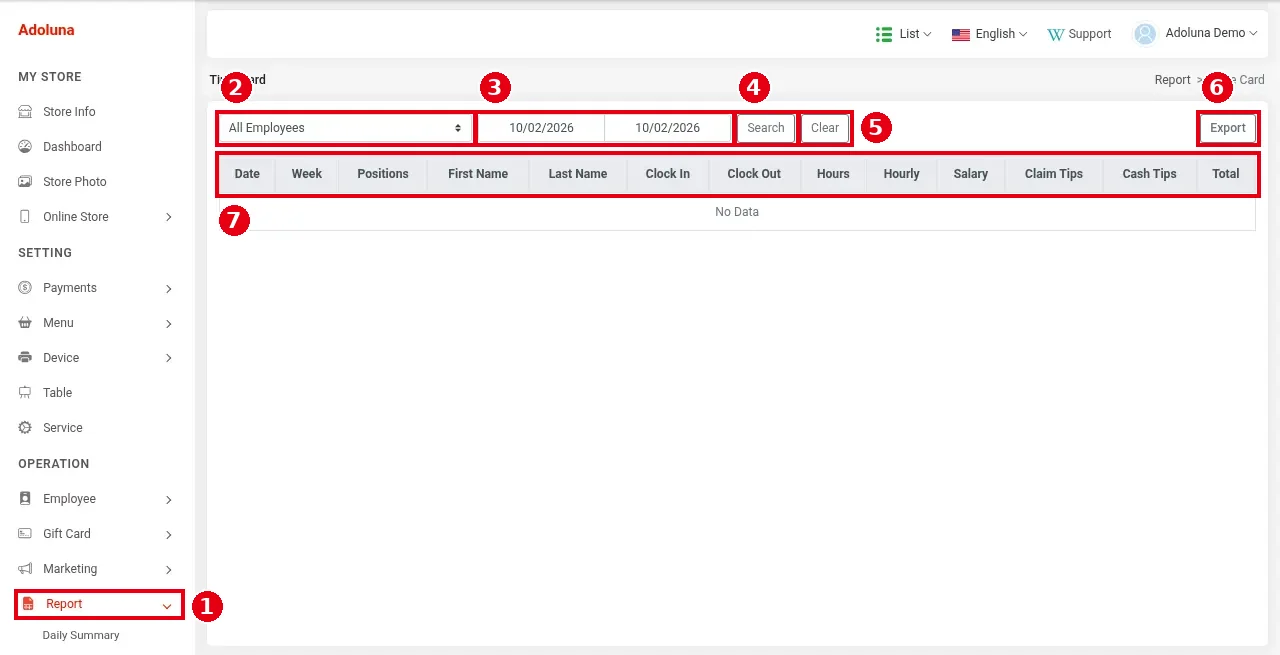
1. In the Backoffice left menu click ① Report, then Time Card.
2. Choose the employee in ② (All Employees for everyone, or a single employee).
3. Choose the start and end dates in ③ and click ④ Search (⑤ Clear resets the filters).
4. List ⑦ has the columns Date, Week (the day of the week, e.g. Monday), Positions, First Name, Last Name, Clock In, Clock Out, Hours, Hourly, Salary (= Hours × Hourly, e.g. 1.18 × 14.00 = 16.52), Claim Tips, Cash Tips and Total. Several clock-ins on the same day show as several rows; ⑧ each employee’s records end with a Total row. If there are no records for the dates, it shows No Data.
5. Click ⑥ Export to download the results as an Excel file for your accountant or payroll software.
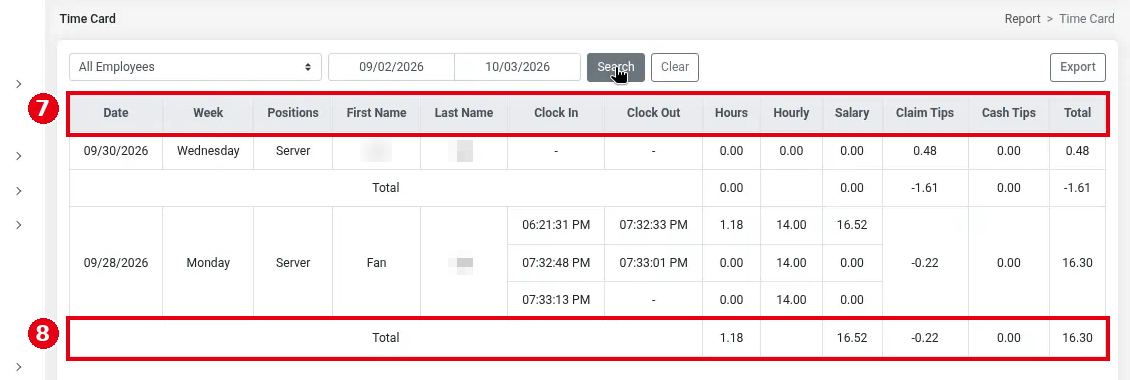
Employees’ last names are blurred in the screenshot.
Notes / FAQ #
-
If a clock time is wrong, fix or add the record at the POS first (see 2.8.5 How to edit or add time card records), then search and export again.
-
Cash Tips are the cash tips the employee enters at clock-out (see 1.5.1 How to clock in, take a break and clock out); Claim Tips is the tip the server is owed: Claim Tips = Total Tip − Tip Pooling (see 2.5.4 How to set up tip pooling) − Transaction Fee (see 2.8.5 How to edit or add time card records).
-
Tips on orders shared by several servers are split evenly among those servers in the back-office reports (see 1.2.14 How to share an order among multiple servers) (updated 2026-10-05).
-
Salary doesn’t count overtime; it is simply Hours × Hourly.
-
You can also see an employee’s Time Card report at the POS (Report > Server > Time Card; see 1.5.6 How to view, print or email POS reports).


