
Purpose: What staff can check first when a card terminal doesn’t respond or won’t connect during a card payment. For: cashiers, servers, managers. Hardware: PAX / BOLT terminals, or a Clover Go 3 / VP3350 reader.
Checks #
1. Make sure you picked the right terminal: in the Credit Card – PAX window each terminal shows its name and IP address (e.g. T4 192.168.9.74), and the selected one is red. Check that it’s the one in front of the guest (see 1.3.2 How to take a credit card payment).
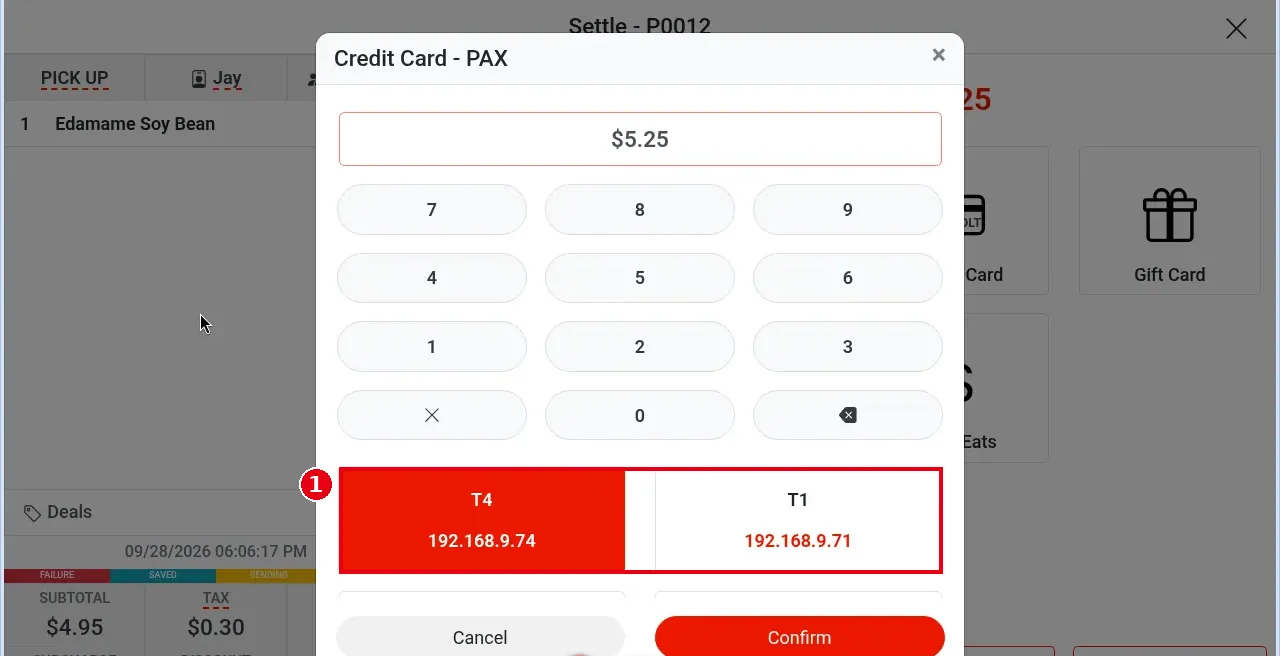
2. Check the terminal itself: is it on, is the screen normal, is the battery charged or is it plugged in?
3. Check the network: PAX terminals connect over the store network (IP) and must be on the same store LAN as the POS. Check the terminal’s Wi-Fi or network cable.
4. Check the local service: PAX terminals work through the local service (Local Server). When a red Local Service Offline shows at the top of the home screen, PAX terminals don’t work; follow the steps in 4.4.1 What to do when the Local Server is offline to check the local server’s power and network cable, restart it and refresh the POS. VP3350 and Clover Go 3 readers connect directly to the POS device and are not affected.
5. Clover Go 3 / VP3350 readers:
– Screen message Card reader not found: for Clover Go 3, check the Bluetooth connection; for VP3350, check the USB cable. The VP3350 does not work on iPhone / iPad.
– For the other short error messages (e.g. Use chip or tap, Card declined), see the error table in 1.3.2 How to take a credit card payment.
– No sound: the POS is probably muted or the volume is low — turn the volume up. When muted, no sound plays, but the on-screen Remove Card prompt still appears. The reader’s own beeps are normal and can’t be turned off.
– If Mastercard / Discover cards keep failing on an older VP3300, this can’t be fixed; replace it with a Clover Go 3 or VP3350.
6. Retry: after checking, start the payment again. Before retrying, make sure the guest has not already been charged (check the terminal screen or ask the guest) to avoid a duplicate charge. If the system says a payment request already exists for this order, tap Cancel unless you’re sure the first request was cancelled (see 4.1.1 Why was a card charged twice, and how do I fix it?).
7. Reconcile before closing the batch that day (see 1.6.2 How to reconcile card transactions before batching) to make sure the terminal and POS transactions match.
8. If everything checks out and it still won’t connect, contact the technical team: +1 (866) 588-8868, support@adoluna.com (see 4.2.1 What to do when a printer isn’t printing).
Notes / FAQ #
-
The payment timeout can be set per terminal in the back office.
-
If an order is stuck in payment (locked), a Cancel button appears after 30 seconds; tap it to cancel the payment. With Clover Go 3 or VP3350 card readers, Cancel is always shown.
-
Other terminals (e.g. PAX, BOLT) run the payment on their own and notify the system when it succeeds. Before taking the payment again after a cancel, make sure the guest wasn’t charged (step 5).


