
Purpose: Explain why an order that has a refund can’t be voided, and what to do when such an order needs to be cancelled. For: managers, cashiers.
Explanation #
Since the 2025-03-30 release, once an order has had a refund (Refund), the whole order can no longer be voided. A refund adds a negative payment line with the refund time on the left of Order Detail (e.g. No.3 Cash : $-5.00, Refund : 09/28/2026 07:16:13 PM; see 1.4.7 How to refund an order).
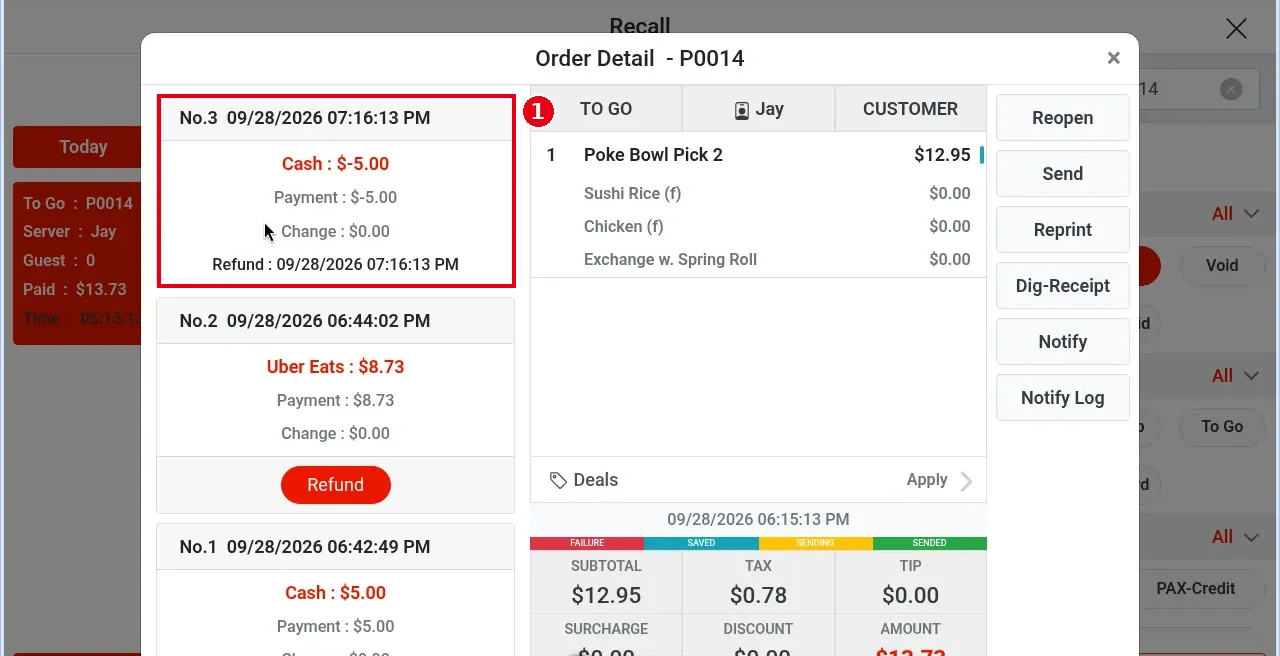
An order with a refund has no Void button on the right of Order Detail, so it can’t be voided. For example, order P0014 above (2026-09-28, with the refund No.3 Cash : $-5.00) shows only Reopen, Send, Reprint, Dig-Receipt, Notify and Notify Log on the right.
What to do #
-
If the whole order needs cancelling, void it first (see 1.4.6 How to void a paid order) instead of refunding. To void: reopen the order → void each payment → void the whole order.
-
If the order has already been refunded and the guest is owed the rest, keep refunding payment by payment (see 1.4.7 How to refund an order). There’s no limit on the number of refunds, but the total can’t exceed the payment amount.
-
If a partly refunded order needs to be cancelled completely and it was paid on PAX, you can only void the whole payment (see step 3 of 1.4.6 How to void a paid order), because PAX can’t refund or change the amount on an existing transaction.
-
In reports, a void reduces the payment amount; a refund doesn’t reduce the payment amount but is added to the refund amount.


